- Execute command /H in command field before executing the transaction/report with authority checks to skip
- Execute the transaction/report. ABAB debugger will be launched.
- In the menu bar select Breakpoints --> Breakpoint at --> Statement...
- In the popup window write authority-check and accept (enter)
- F8 to continue with the execution. The execution will stop when first authority-check statement is reached. For example:
- F5 to execute the statement and check if system variable sy-subrc has a value not equal to 0.
- If it has a value not equal to 0, this means that you don't have authorization for this authority check and that you will be allowed to go on with the execution. If it is 0, F8 to go on until the next authority-check statement.
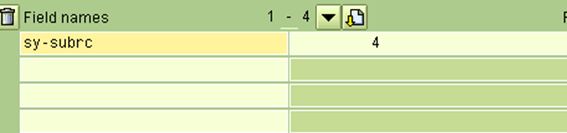
- When you reach an authority-check and execute it and sy-subrc has a value not equal to 0, then you will have to update sy-subrc to 0 in order to be allowed to go on with the execution. To do this, just write sy-subrc in one of the field-names fields
- and overwrite variable's value to 0 in the field at the right and press the button with the pencil
- F8 to go on. You will have to repeat previous steps in all authority-check statements reached where sy-subrc is valuated to non 0 value when it is executed

You will receive a message saying that debugging has been switched on

If you don't receive this message, you are not allowed to debug and unfortunately you won't be able to apply this trick