Showing posts with label authorizations. Show all posts

Wednesday, November 16, 2011

How to skip any authority check

If you are allowed to debug a SAP system, you can easily skip any authority check that avoids you to execute a program or transaction. You only have to follow these steps:
  1. Execute command /H in command field before executing the transaction/report with authority checks to skip
  2. You will receive a message saying that debugging has been switched on
    If you don't receive this message, you are not allowed to debug and unfortunately you won't be able to apply this trick
  3. Execute the transaction/report. ABAB debugger will be launched.
  4. In the menu bar select Breakpoints --> Breakpoint at --> Statement...
  5. In the popup window write authority-check and accept (enter)
  6. F8 to continue with the execution. The execution will stop when first authority-check statement is reached. For example:
  7. F5 to execute the statement and check if system variable sy-subrc has a value not equal to 0.
  8. If it has a value not equal to 0, this means that you don't have authorization for this authority check and that you will be allowed to go on with the execution. If it is 0, F8 to go on until the next authority-check statement.
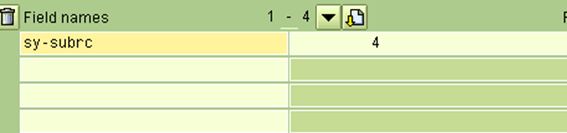
  9. When you reach an authority-check and execute it and sy-subrc has a  value not equal to 0, then you will have to update sy-subrc to 0 in order to be allowed to go on with the execution. To do this, just write sy-subrc in one of the field-names fields
  10. and overwrite variable's value to 0 in the field at the right and press the button with the pencil
  11. F8 to go on. You will have to repeat previous steps in all authority-check statements reached where sy-subrc is valuated to non 0 value when it is executed

Friday, September 16, 2011

SU53 User authority data

It is very usual that any user cannot execute some transaction or report due to any authorization issue. 

In order to know what authorization is failing, we can execute transaction SU53. This transaction will show for which authorization object we don't have the required authorizations.


Please note that you will have to execute SU53 just inmediately after the error message is displayed. 

Wednesday, August 31, 2011

Do you need to execute a transaction you are not authorized for?

You need to execute a transaction for which you don't have authorization. You need to test something urgentely and you can wait to be authorized. What can you do?

You can set a breakpoint in function module AUTH_CHECK_TCODE, change the value of a variable when the breakpoint is reached and go on! Let see with an example:

I am not authorized for transaction MB11:


Go to SE37 and display the code of function module AUTH_CHECK_TCODE and set a breakpoint here:

  call 'AUTH_CHECK_TCODE'
       id 'TCODE' field tcode.

  if sy-subrc = 0. <--Set your breakpoint in this line*   auth_check_tcode enthält die Prüfungen von tcode_executable,
*   daher im OK-Fall keine Aufruf nötig.
  else.
    perform tcode_executable using tcode.
*   Keine Berechtigung für Transaktion &
    message i077(s#) with tcode raising not_authorized.
  endif.

This is a system function module, so execution won't stop at one breakpoint on it if you don't have System Debug activated. To activate System Debug: System --> Utilities --> Debug System

Once activated, we execute MB11 and the debugger is started:

Press F8 to continue until breakpoint is reached. When it is reached
double click over sy-subrc to be able to change its value from 4 to 0:

Change sy-subrc field content from 4 to 0, press the button with the pencil:
and F8 to continue with the execution and... 

Great! MB11 transaction's initial screen is showed: